

Online Exclusive Offer for Selected Customers1Footnote remark [1]
Preferential rate for Renewal Time Deposit
With the Hang Seng Personal e-Banking or
Hang Seng Mobile App, you can easily update
the Time Deposit maturity instruction at least one working day
(before 19:55 on Monday to Friday and before 16:55 on Saturday)
prior to the maturity date from the comfort of your home.
Now you can enjoy online exclusive renewal offer by renewing
designated Time Deposit online! Simply enable Marketing Push
Notification via Mobile App, you’ll receive alert before
maturity and notification of the latest offers! Want to know
which time deposit can enjoy the offer? Please refer to
step 3 of the illustration.
Online Exclusive Time Deposit Renewal Offer
From , you can enjoy the following preferential interest rate offers by renewing a maturing Time Deposit online2Footnote remark [2].
FAQs and demonstrations
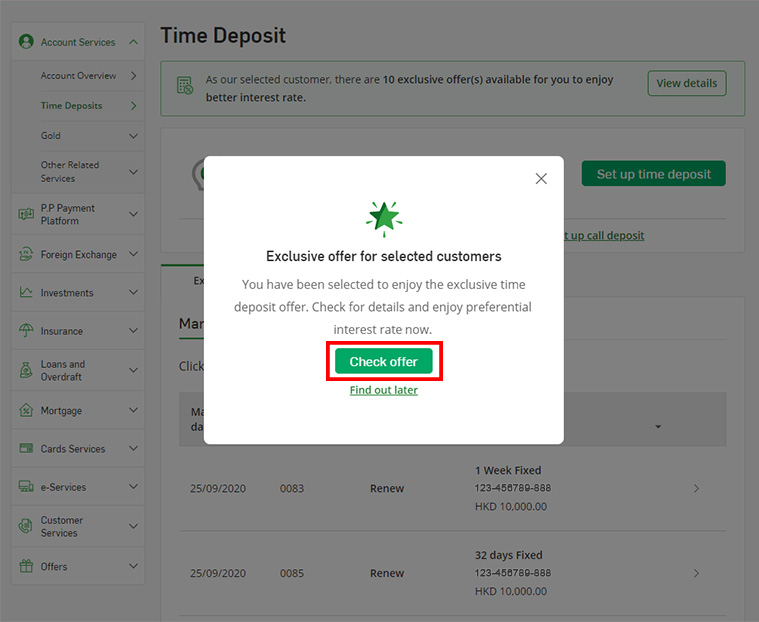
Step 1
- Log on to Hang Seng Personal e-Banking > Select "Account Services" > "Time Deposits" from the drop-down list.
- Click on the button "Check offer" on the pop-up message to view your exclusive Time Deposit offer.
- To enjoy the Time Deposit renewal offer, customer must amend the maturity instruction at least one working day (before 19:55 on Monday to Friday and before 16:55 on Saturday) prior to the maturity date via Hang Seng Personal e-Banking or Hang Seng Mobile App.
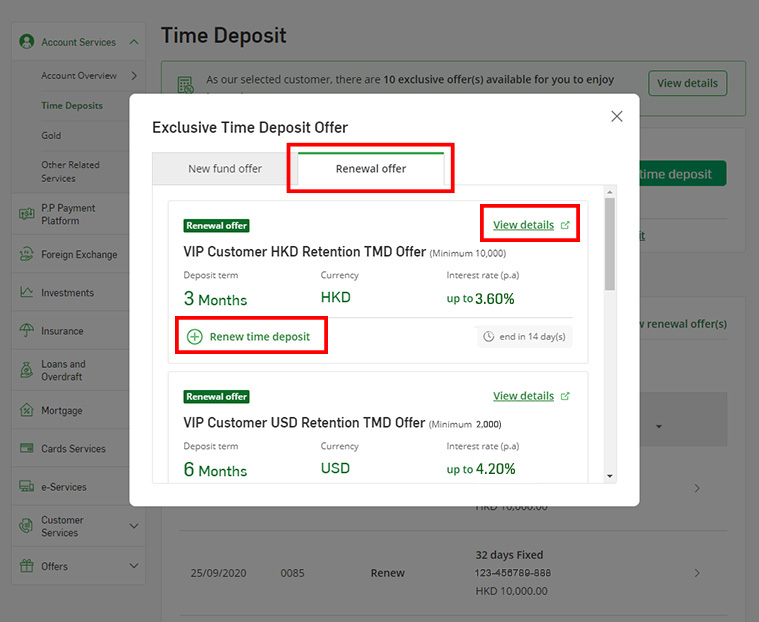
Step 2
- Select the tab "Renewal offer".
- Click on the link "View details" to view the promotion details of the respective renewal offers.
- Select "Renew time deposit" for the renewal offer you would like to enjoy.
- The offers in the screenshots are for illustration only.
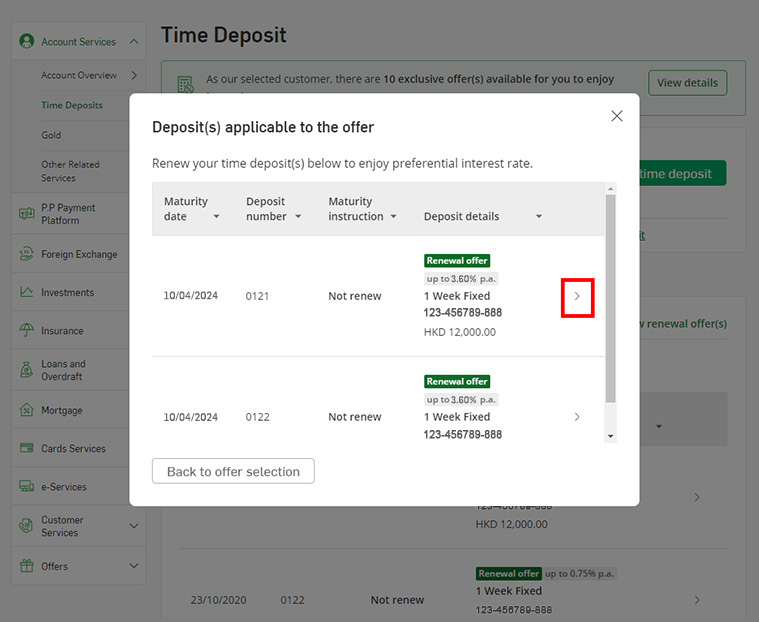
Step 3
- Click on ">" to choose the maturing Time Deposit you would like to renew under the renewal offer.
- Only Time Deposit(s) eligible for the renewal offer will be displayed.
- The offers in the screenshots are for illustration only.
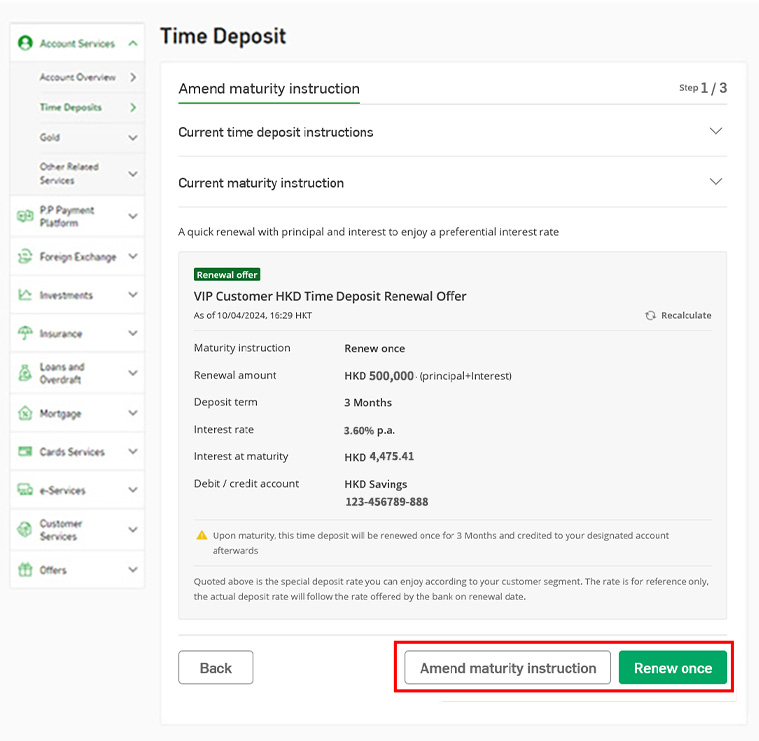
Step 4
- Review the maturity instruction and click on the button "Renew once".
- In case any amendment is required, click on "Amend maturity instruction".
- Upon maturity, the time deposit will be renewed once, and the principal and interest will be credited to your designated account afterwards.
- The offers in the screenshots are for illustration only.
Step 5
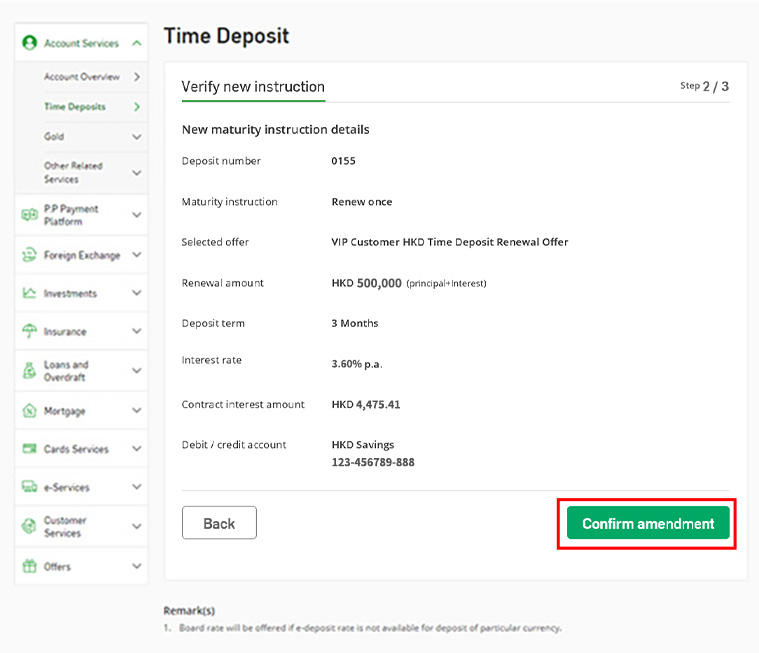
- Verify the details of the new maturity instruction and click on the button "Confirm amendment" to proceed. The Time Deposit will be renewed on the maturity date according to your instruction.
- The offers in the screenshots are for illustration only.
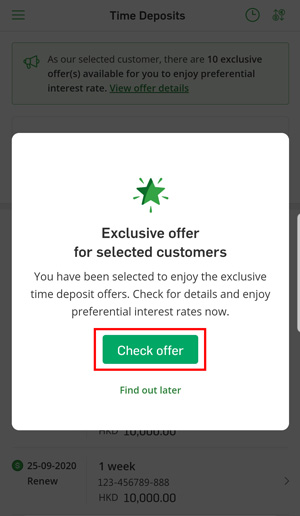
Step 1
- Log on to Hang Seng Personal Mobile App > Select "Account Services" > "Time Deposits" from the drop-down list.
- Click on the button "Check offer" on the pop-up message to view your exclusive Time Deposit offer.
- To enjoy the Time Deposit renewal offer, customer must amend the maturity instruction at least one working day (before 19:55 on Monday to Friday and before 16:55 on Saturday) prior to the maturity date via Hang Seng Personal e-Banking or Hang Seng Mobile App.
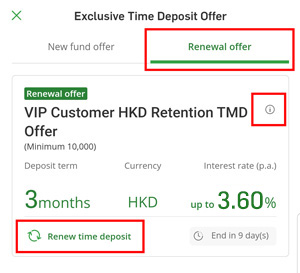
Step 2
- Select the tab "Renewal offer".
-
Click on the "
" icon to view the promotion details of the respective renewal offers.

- Select "Renew time deposit" for the renewal offer you would like to enjoy.
- The offers in the screenshots are for illustration only.
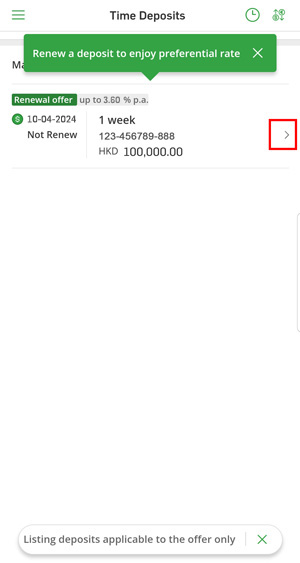
Step 3
- Click on ">" to choose the maturing Time Deposit you would like to renew with the renewal offer.
- Only Time Deposit(s) eligible for the renewal offer will be displayed.
- The offers in the screenshots are for illustration only.
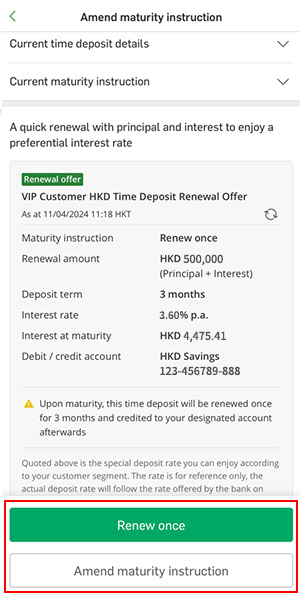
Step 4
- Review the maturity instruction and click on the button "Renew once".
- In case any amendment is required, click on "Amend maturity instruction".
- Upon maturity, the time deposit will be renewed once, and the principal and interest will be credited to your designated account afterwards.
- The offers in the screenshots are for illustration only.
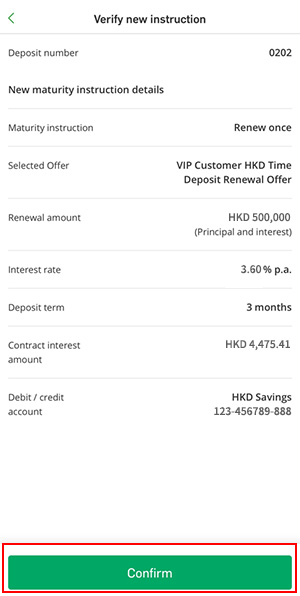
Step 5
- Verify the details and click on the button "Confirm" to proceed. The Time Deposit will be renewed on the maturity date according to your instruction.
- The offers in the screenshots are for illustration only.
- To enjoy the Time Deposit renewal offer, customer must amend the maturity instruction at least one working day (before 19:55 on Monday to Friday and before 16:55 on Saturday) prior to the maturity date via Hang Seng Personal e-Banking or Hang Seng Mobile App.
- 3 simple steps to enable Marketing Push Notifications, please click here for details.