

Online Exclusive Offer for Selected Customers
Preferential rate for New Fund Time Deposit
From , Selected Customers1 can enjoy the preferential interest rate by placing a designated Time Deposit with designated amount of Eligible New Fund Balance2 within transaction time3 via Online Banking (including Hang Seng Personal e-Banking and Hang Seng Mobile App).
Log on Online Banking > “Account Services” > “Time Deposits” now to check your exclusive offers!
FAQs and demonstrations
Step 1
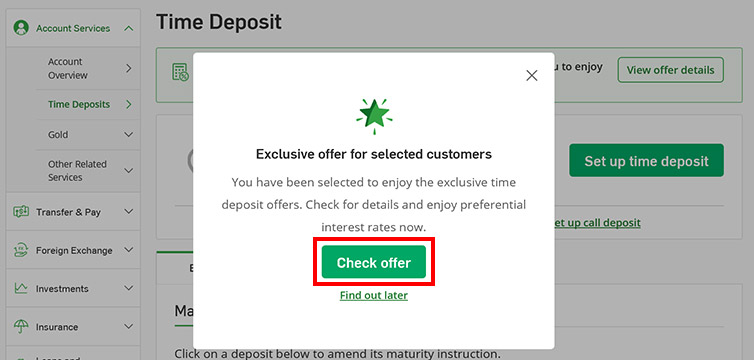
- Log on to Hang Seng Personal e-Banking during the transaction time, select "Account Services" > "Time Deposits" from the drop-down list.
- Click on the button "Check offer" on the pop-up message to view your exclusive Time Deposit offer.
Step 2
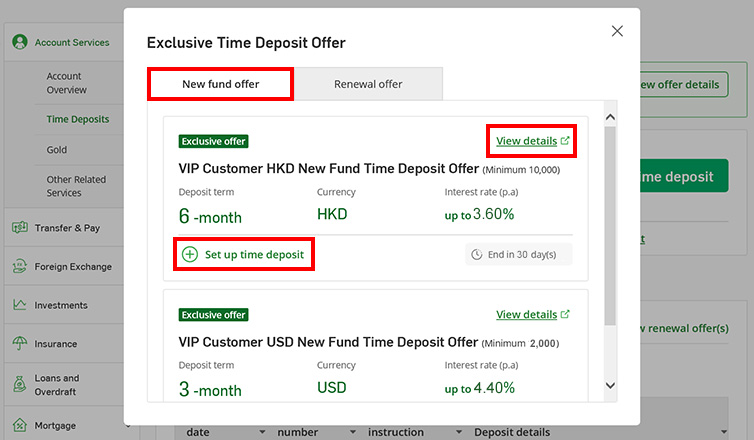
- Select the tab “New fund offer".
- Click "View details" for the promotion details of the respective new fund offers.
- Click "Set up time deposit".
Note:
- The offer in the screenshot is for illustration only.
Step 3
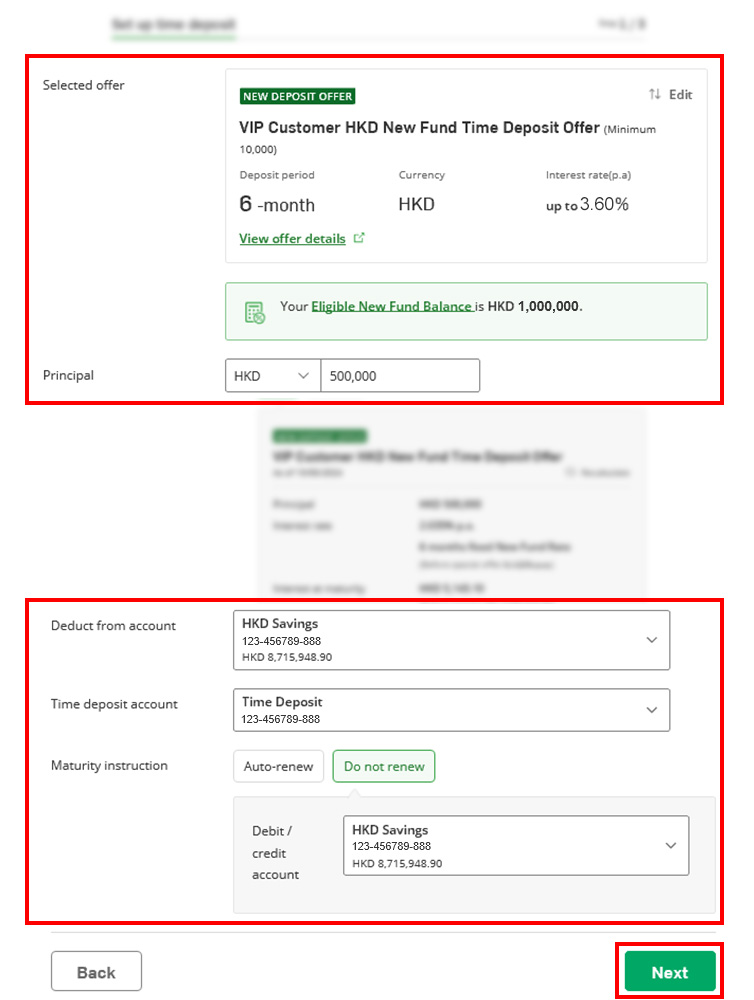
- Input an amount capped at the "Eligible New Fund Balance" to enjoy the new fund offer.
- Select "Deduct from account", "Time deposit account" and "Maturity instruction", then click "Next".
Note:
- The offer in the screenshot is for illustration only.
Step 4
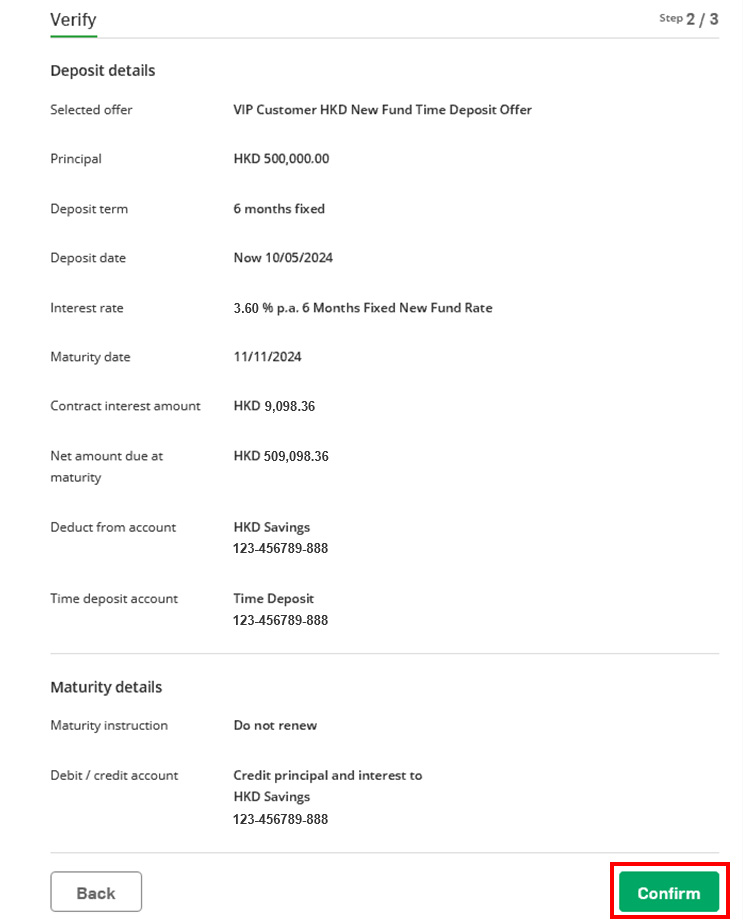
- Review the Time Deposit details and click "Confirm".
Note:
- The offer in the screenshot is for illustration only.
Step 1
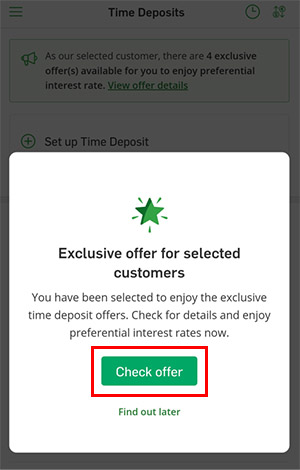
- Log on to Hang Seng Mobile App during transaction time, select "Account Services" > "Time Deposits" from the drop-down list.
- Click on the button "Check offer" on the pop-up message to view your exclusive Time Deposit offer.
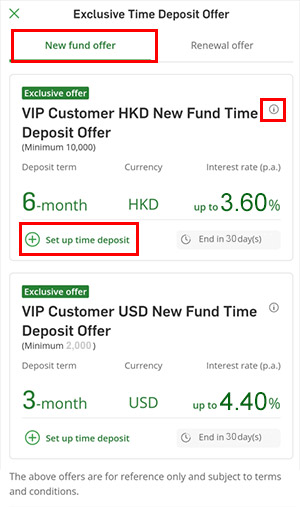
Step 2
- Select the tab “New fund offer".
-
Click “
 "
for the promotion details of the respective new
fund offers.
"
for the promotion details of the respective new
fund offers.
- Click "Set up time deposit".
Note:
- The offer in the screenshot is for illustration only.
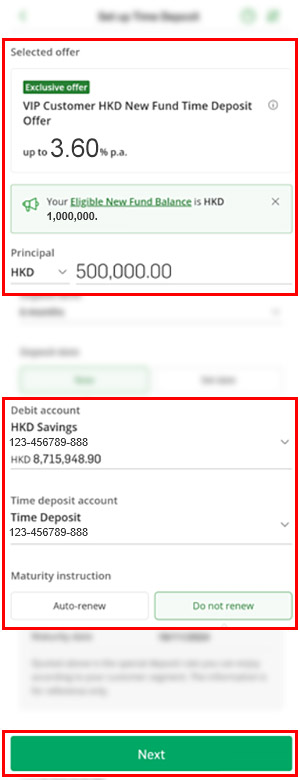
Step 3
- Input an amount capped at the "Eligible New Fund Balance" to enjoy the new fund offer.
- Select "Deduct from account", "Time deposit account" and "Maturity instruction", then click "Next".
Note:
- The offer in the screenshot is for illustration only.
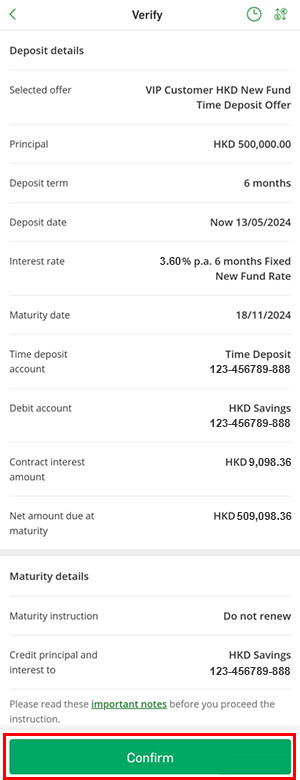
Step 4
- Review the Time Deposit details and click "Confirm".
Note:
- The offer in the screenshot is for illustration only.
To enjoy the New Fund Time Deposit Offer, please place the
Time Deposit within transaction time:
Hang Seng Personal e-Banking and Hang Seng Mobile
App
If the Time Deposit is placed outside the transaction time,
or on any Sunday, Hong Kong public holiday, holidays of the
country or region where the currency is issued, or
non-clearing day due to adverse weather condition such as
typhoon signal or rainstorm warning, you will not be able to
enjoy the above new fund preferential rate offer.
- Mondays to Fridays : 8am to 7:55pm
- Saturdays : 8am to 4:55pm (only applicable to HKD)
You can fund-in via
Remittance or Demand Draft. Please
prepare the following information before you start:
- Payee details (Name, address and bank account number)
- Our bank name: Hang Seng Bank Limited
- Our bank address: 83 Des Voeux Road Central, Hong Kong
- Our bank code: 024
- Our bank SWIFT code: HASEHKHH
- Our bank CHIPS no. (For remittance from USA): 010522
